
Gym Tracker · iPhone shortcut + Notion

Log the set
in four taps.Without opening an app.

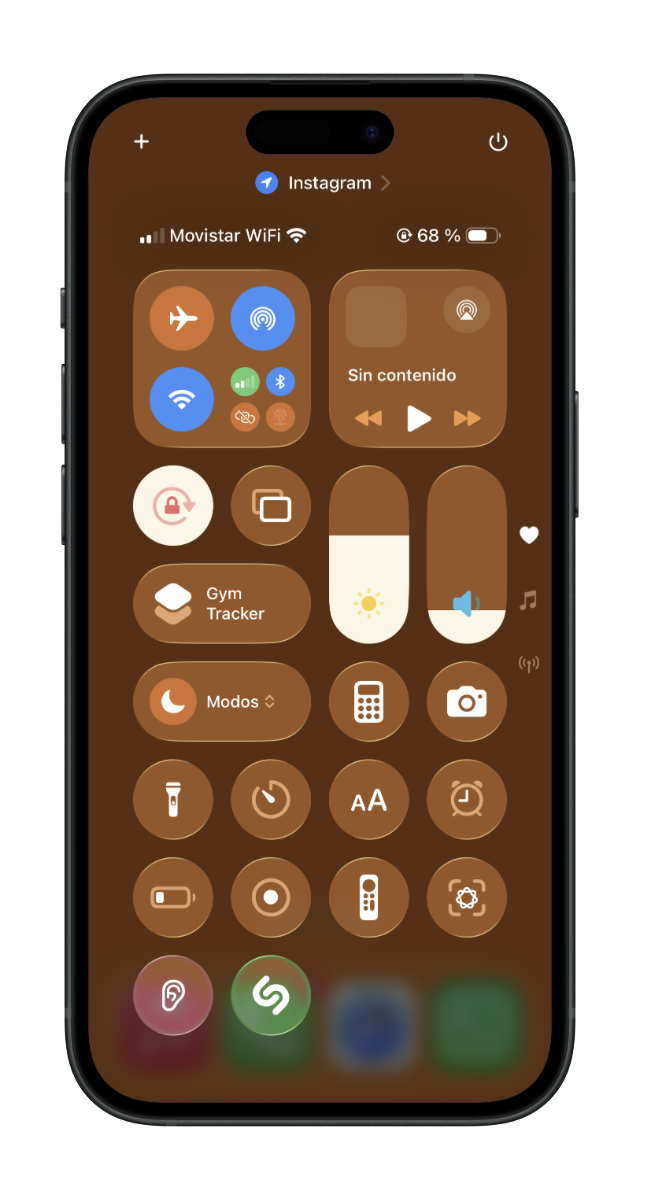
REPZ lives in your iPhone's Control Center, next to the Wi-Fi and the torch. You swipe, pick the exercise, type reps and weight, and the set lands in your own Notion with the date and time. Then you go back to the bar.
Pay once No subscription 10-minute setup
An iPhone Control Center with the Gym Tracker button among the quick controls

01 — The point

Logging the workout shouldn't cost more than the workout.

Everyone knows you should keep a record. Almost nobody keeps one past three weeks. It isn't a discipline problem: every option pulls you out of the gym.

  • 01

    The notebook

    Works until you forget it, it gets wet, or it runs out. And comparing March's bench press to today's means flicking through pages.

  • 02

    The notes app

    You start out tidy and a month later you have a four-thousand-line wall of text that tells you nothing.

  • 03

    Gym apps

    Unlock, open, wait for the splash screen, search the exercise, close the ad. And €9.99 a month to store two numbers for you.

REPZ isn't another app. It's a button.

02 — The flow

Four questions between the set and your database.

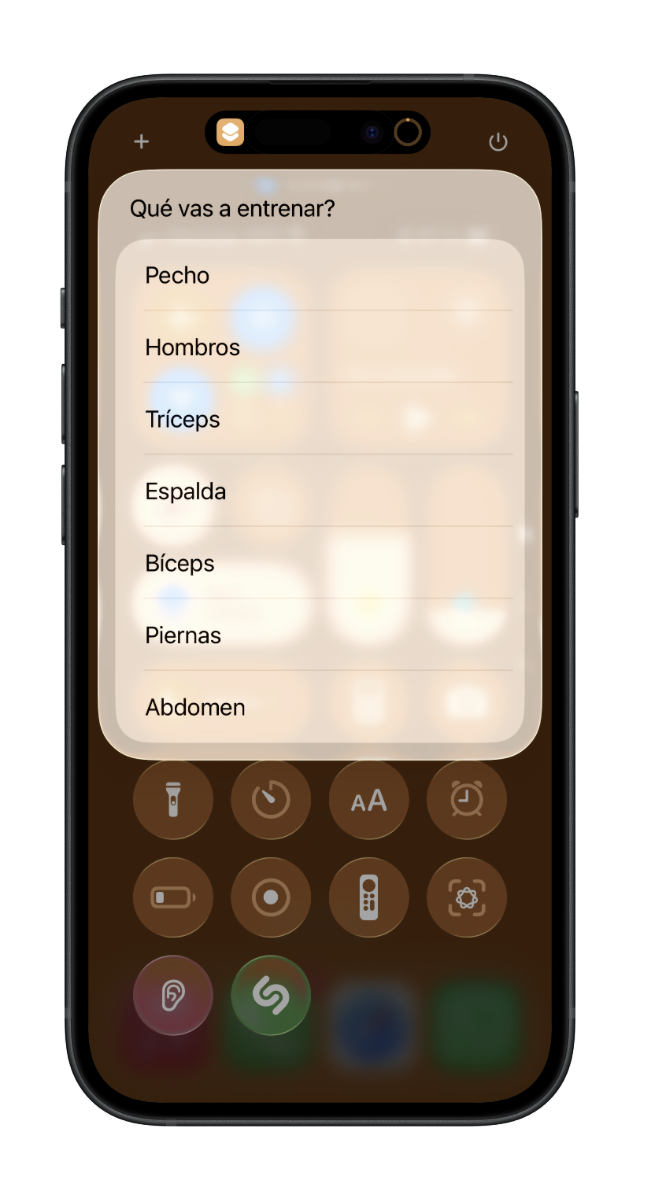
You open it from Control Center —the screenshot up top— and the shortcut asks four things. These are screenshots of the actual shortcut running on an iPhone: no loading screen, no account to create, no login.

01

The shortcut asks what you are training and lists the muscle groups

Pick the muscle group

Chest, shoulders, triceps, back, biceps, legs, abs. The list comes from your Notion, so you order it however you want.

02
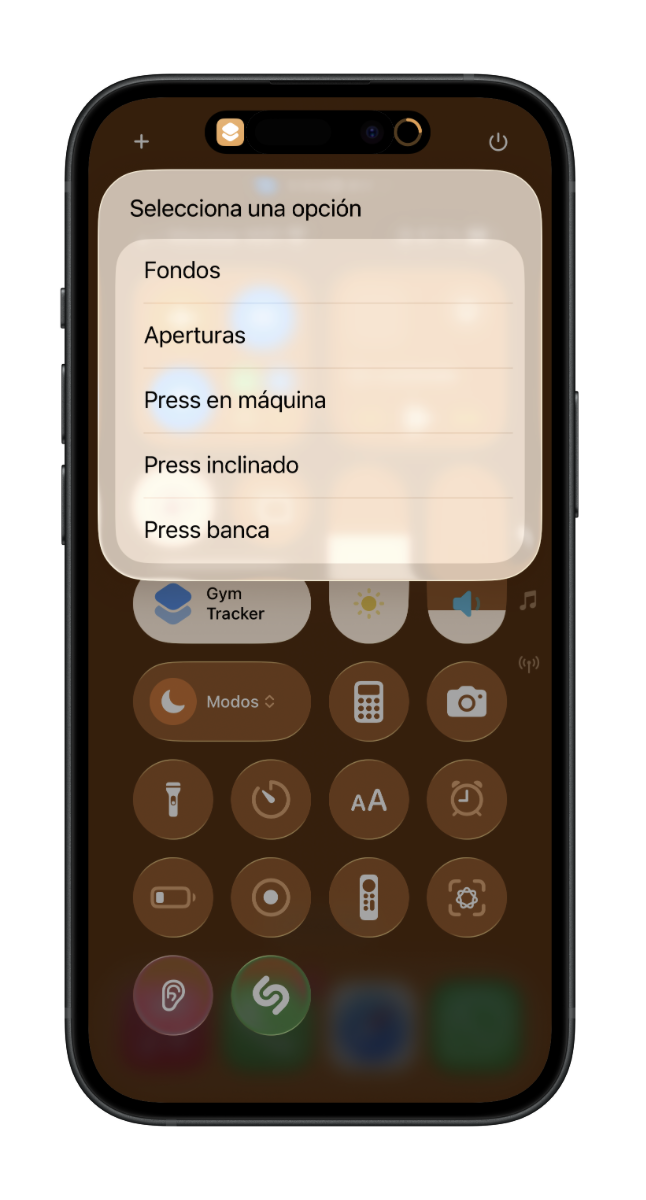
Chest exercise list: dips, flyes, machine press, incline press, bench press

Pick the exercise

Each group brings its own. Add “Arnold press” to the template tonight and tomorrow it shows up here without touching the shortcut.

03
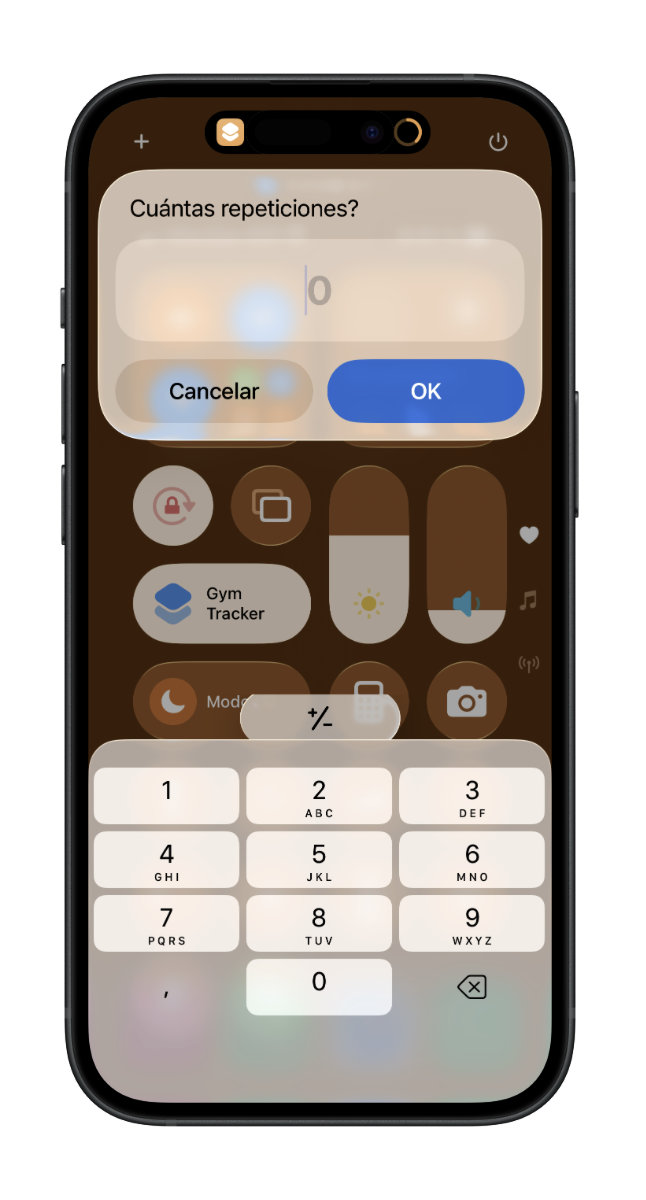
The shortcut asks how many reps with a number pad

Type the reps

Number pad and OK. The reps of that specific set, not of the whole exercise.

04
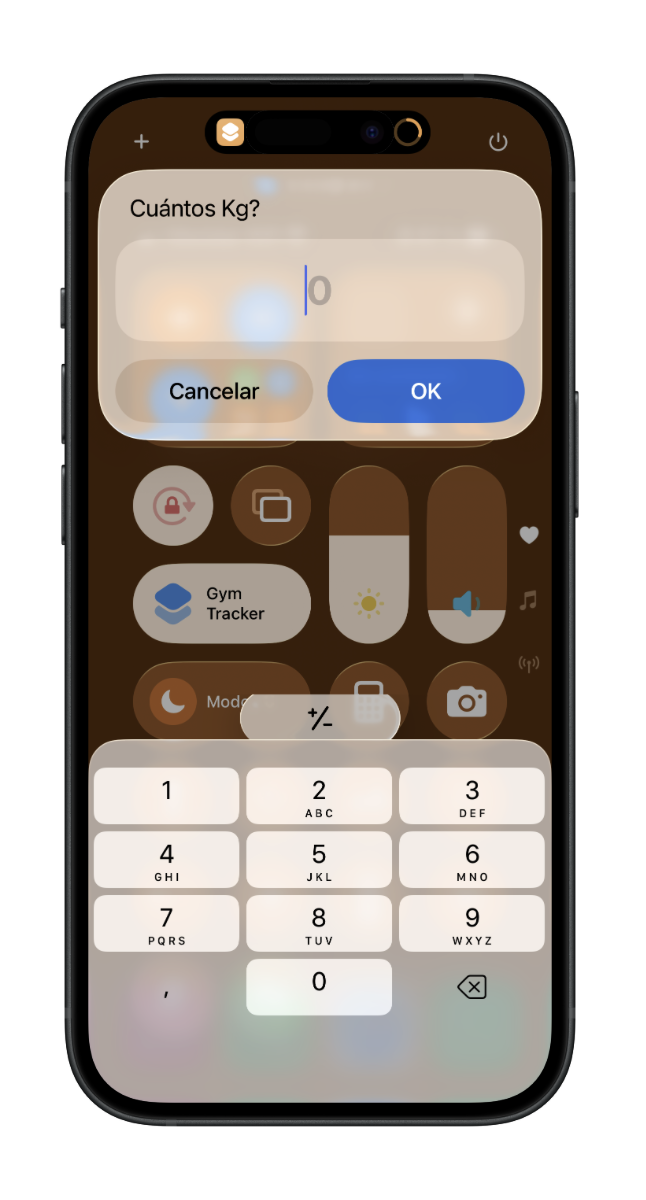
The shortcut asks how many kilos with a number pad

Type the weight. Saved.

The row lands in Notion with exercise, group, weight, reps, volume and date. You're already loading the next plate.

03 — The package

Three pieces. All three set up once.

You buy and get the guide straight away, with the other two links inside it. It walks you through from zero: the most technical thing you'll do is copy and paste three codes.

Piece 01

The iPhone shortcut

A file for Apple's Shortcuts app. You install it from a link and set it up once with your Notion codes.

  • Works with the native Shortcuts app
  • Added to Control Center
  • Also runs from the lock screen

Piece 02

The Notion template

Two connected databases: the training log and your exercise catalogue sorted by muscle group.

  • Duplicated to your account in one click
  • Volume calculated automatically
  • Editable from top to bottom

Piece 03

The setup guide

A PDF with a screenshot of every screen, step by step. Written for someone who has never touched an API.

  • About 10 minutes start to finish
  • Nothing strange to install
  • Email support if you get stuck

04 — Your data

It all ends up in a table that is yours.

The shortcut writes straight into your Notion with your own token. We have no server, we don't store your workouts and we can't see any of it.
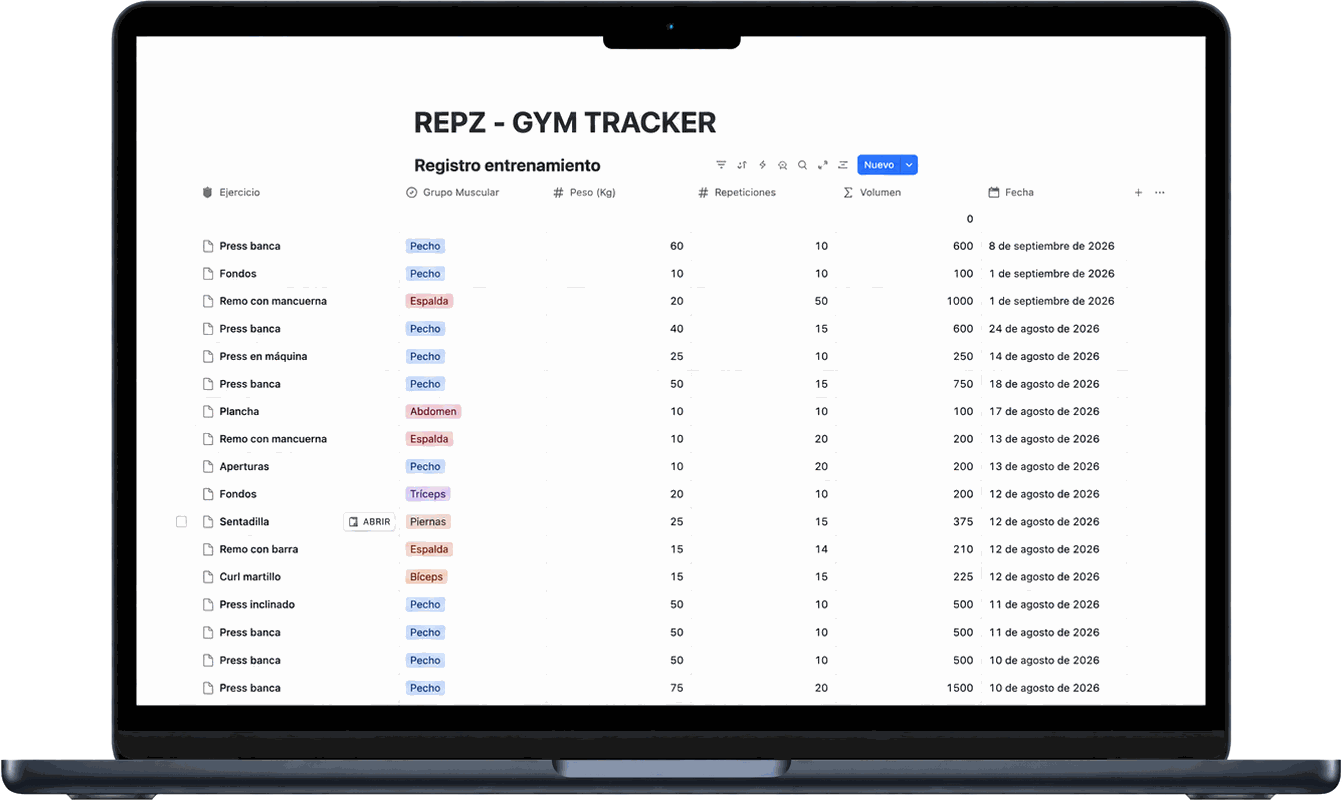
The REPZ training log database open in Notion on a laptop
Swipe the table to see it all →

What gets saved with every set

Exercise
Bench press, row, leg press… whichever you picked in the shortcut.
Muscle group
A colour tag so you can filter and group by session.
Weight (kg)
The number you typed, no rounding.
Reps
The reps of that specific set, not of the whole exercise.
Volume
Weight × reps. Notion works it out on its own.
Date
Filled in automatically the moment you save.

Because it's Notion, you open it on your phone, your laptop or in the browser. And if one day you stop using REPZ, the table is still yours: export to CSV and that's that.

05 — The price

You pay once and that's it.

Less than one month of any training app. And there is no second month.

REPZ · Gym Tracker

€14.99 VAT included · one payment

No renewal, no monthly fee, no small print.

  • iPhone shortcut ready to install
  • Notion template you duplicate
  • Setup guide as a PDF with screenshots
  • Future template improvements included
  • Email support during setup
Buy now

06 — Questions

What people always ask.

Is this a subscription?
No. You pay €14.99 once and the shortcut and the template are yours. There is no renewal and no recurring charge.
Does it work on Android?
No. The heart of REPZ is Apple's Shortcuts app, which only exists on iPhone, iPad and Mac. If you're reading this on an Android, don't buy it.
Do I need to pay for Notion?
No. Notion's free plan lets you create the database, duplicate the template and generate the API token. It will never ask you for a card for this.
Do I need to know how to code?
No. The guide is annotated screenshots. The hardest part is copying three codes from Notion and pasting them into the shortcut the first time. After that you never touch it again.
How long until it's running?
About 10 minutes if you follow the guide calmly. The part people find trickiest is creating the API connection in Notion, and that's explained screen by screen.
Can I add my own exercises?
Yes, and that's the point. The shortcut reads the exercise list from your Notion. Add, rename or delete whatever you like in the template and the shortcut picks it up on its own.
Can you see my workouts?
No. The shortcut talks directly from your iPhone to your Notion using a token you generate yourself. REPZ has no servers and no database, so there is nowhere for us to look.
Does it work with no signal at the gym?
Saving a set needs a connection, because it writes to Notion right then. A basement with no signal is the one weak spot: on gym Wi-Fi or mobile data it's fine.
What if I regret it?
It's a digital product delivered instantly, so on purchase you waive the 14-day right of withdrawal (article 103.m of Spanish consumer law). That said: if something doesn't work for you, email us and we'll fix it or refund you.

You're training tomorrow. Put it in writing.

€14.99 once. Ten minutes of setup. And from then on, every set you do gets saved without you having to think about it.